

An animation shows what Helio Guard does at a firm called Thistlecombe. Tom pastes a client's email address and bank details into ChatGPT. Helio Guard swaps them for labels and the question still goes. A customer file does not upload to DeepSeek. A card number and a secret key are taken out. DeepSeek is blocked. Liam agrees the AI policy.
Keep company and client data out of AI
ChatGPT, Copilot, Gemini and the rest. Every paste and upload is checked on the PC. Bank details, passwords, staff and client records come out. The question still goes through.
Start free trialChecks every paste and upload into
Reviewed and listed by
Listed in theChrome Web Store Listed inMicrosoft Edge Add-ons Firefox add-onSigned by MozillaPaste something in and see what the AI would get
Use made-up details. A fake card number, a sort code, an email address. It runs in your browser and nothing is sent.
This page uses part of the real rules. It checks card numbers with the Luhn check, UK bank details, email addresses, NI numbers and secret keys.
What the AI site gets
Staff paste client data into AI every day, and you can't see it happen
Helio Guard fixes that on every PC, without banning AI. Your team keeps the time it saves.
Your own and your clients' bank details, card numbers, client lists and passwords come out on the PC. Before anything is sent.
BANK DETAILS taken out for Tom, in ChatGPT
See who keeps pasting sensitive data, and what kind. Have a word, or train them, before it becomes a habit.
Sarah 4 catches this month, mostly client emails
AI tools nobody approved, people who have not agreed your policy, and PCs that have stopped reporting. All on one list.
In use, not approved
A dated AI policy for every person, and a monthly record. Ready when a client, insurer or auditor asks.
22 of 24 agreed the AI policy, with dates
One screen shows what was kept out, and where AI is used
Open it once a month, or let the report come to you. These are real screens from a sample company.
Today, at a sample company
24 of 24 PCs protected
Every paste and upload into an AI site is checked first.
- AI websitesPastes and uploads checkedChecked
- Every main browserFive browsers, on every PCCovered
- Private windowsOff, unless you allow themClosed
- Browser AI assistantsGemini in Chrome, Copilot in EdgeOff
AI policy, version 3
22 of 24 agreed, each with a date

Real Helio Guard screens. Sample companies, not customers.
We never see what your team types
Helio Guard checks text on the PC itself, with fixed rules. No AI reads it. The text never leaves the PC, so there is nothing for us to see, store or lose.
An animation shows Tom's message checked on his PC. Only the cleaned message goes to ChatGPT. Only a short record reaches Helio Guard, and the message itself is never sent.
1The check runs on the PC
It also finds bank details, NI and NHS numbers, passwords, secret keys and lists of people.
Fixed rules, like the check banks use on card numbers. No AI model reads the text.
2Our server takes five fields
- Kind
- Card number
- AI site
- chatgpt.com
- Person
- Tom
- What happened
- Taken out
- When
- 4 Oct 10:42
- The text
- Refused
File names, page titles and full web addresses are refused too. We cannot read, sell or train on your text.
3You stay in control
Helio Guard is on for every PC until you switch it off.
- We keep your settings and the short records. Nothing else.
- Staff are told, and agree your AI policy once.
- AI sites only. Other browsing is never read.
- No remote-access software in the agent.
Switch it off, or remove it from every PC, at any time.
What Helio Guard does on every PC

An animation shows Jo uploading Customers October.xlsx to DeepSeek. Helio Guard counts 214 names, 214 emails and 198 phone numbers. The file does not upload, and Jo is offered Microsoft 365 Copilot.

An animation shows the AI sites list at Thistlecombe. DeepSeek changes from Allowed to Blocked, and the rule reaches all 24 PCs.

An animation shows Thistlecombe's AI policy appearing on an AI site. Liam presses I agree, and the agreement joins the records with the date and time.

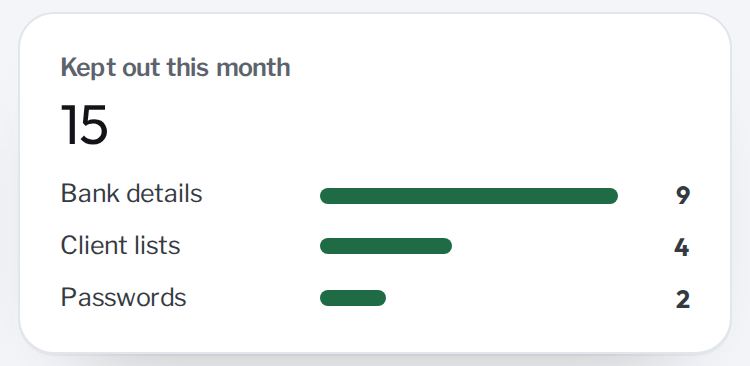
An animation shows the dashboard counting to 12 times data was kept out this month, by kind. Beside it, the October report email lists what was kept out and what to decide next month.

An animation shows Helio Guard going out through Intune to all 24 PCs at Thistlecombe. Each PC turns protected, then every PC receives the company's rules.
 ProtectedProtectedProtectedProtectedProtectedProtected
A customer list never uploads
Dragging in a whole file is the biggest leak there is. Helio Guard reads it on the PC first.
- Jo drags a customer list onto an AI site.
- Helio Guard opens it on the PC and counts what is inside.
- The upload stops. Nothing is sent anywhere.
- Jo is pointed to the AI tool the company pays for.
Excel, Word, PowerPoint, PDF and text files are checked. Images and scanned PDFs are not, yet.
You decide which AI sites are fine
One rule per site, for every PC in the company. Change it once and every PC has it within the hour.
- Company toolYour own AI tool. Pastes are still checked.
- AllowedFine to use. Pastes are still checked.
- Suggest company toolA note points to your tool. They can carry on.
- BlockedThe page does not load.
Rules are per website. A personal and a company account on the same site share one rule.
Everyone agrees the rules once, with a date
The first time each person opens an AI site, they see your short AI policy.
- Liam opens an AI site for the first time.
- Your policy appears. Three plain points.
- Liam agrees. The date and time go on your records.
Change the wording and everyone sees the new version once.
See what was kept out, and where
One screen for the owner, and a short email each month. Keep it as your record of how AI is controlled.
- What was kept out. By kind of data, by AI site and by person.
- Who needs a word. The people who keep pasting the same thing.
- What needs a decision. New AI tools people tried, to approve or block.
- What AI can reach. AI tools someone has connected to files, email or a database.
Install it once and every PC is covered
One small installer for a small team. One package for a whole estate. Nothing to set up in the browser.
- Install. Run the small setup file on each PC. Or send the signed MSI through Intune, Group Policy or your RMM.
- No browser setup. The agent adds the protection to Chrome, Edge, Firefox, Brave and Vivaldi itself.
- Set your rules once. They reach every PC within the hour.
Another browser or a private window won't get past it
Helio Guard covers the browsers on every PC and closes the gaps around them. Staff can't switch it off.

An animation shows Priya's PC at Thistlecombe. Chrome, Edge, Firefox, Brave and Vivaldi turn protected. Private windows and the browsers' own AI assistants are off. Someone removes Helio Guard from Brave, and it is put back three minutes later.
- Every main browserChrome, Edge, Firefox, Brave and Vivaldi on every PC, including ones installed later.
- Private windows stay shutA private window runs without add-ons, so Helio Guard turns them off. You can allow them in settings.
- Browser assistants, offGemini in Chrome, Copilot in Edge and Brave Leo can't be checked. They stay off until you approve them.
- It puts itself backIf someone takes it out of a browser, it is back within minutes. Browser rules your IT already set are left alone.
One price, per person
For your business
£1a person a month
£24 a month for your whole team
The smallest plan covers 5 people. 14 days free. No card needed.

- Pastes, messages and uploads checked
- Bank, card, NI and NHS numbers, passwords and keys
- Your own confidential words
- A rule for each AI site
- Your AI policy, agreed and dated
- The dashboard and a monthly report
Prices are set for each currency, not converted.Look after IT for other companies? See partner rates
Sell Helio Guard to your clients
Your clients are already using AI. Give them a safe way to do it, and show them it working.
- Roll it out with what you already use. Your RMM, Intune or Group Policy.
- Set rules once for every client. Or give one client its own.
- One view across every client. See what was kept out, and where.
- A monthly report for each client. It shows the work you are paid for.
Partner rates per person, with room for your margin. A badge your clients can check, and a listing that sends you work.

An animation shows an IT provider's view of four example clients. Each shows people covered, data kept out and policy agreements. Their Helio Guard Partner badge sits above.

Straight answers
The eight we are asked most. Staff questions, files and set-up are on the support page.
Can anyone at our company read what staff typed?
No. The text is checked on the PC and then forgotten. The business sees the kind of data, the AI site, the person, what happened and when. We never receive the text either.
Does Helio Guard use AI to read our data?
No. It uses fixed rules that run on each PC. No text is sent to an AI model to decide anything, ours or anyone's.
Which AI sites does it cover?
ChatGPT, Claude, Gemini, AI Studio, NotebookLM, Copilot, Microsoft 365 Copilot, Perplexity, DeepSeek, Le Chat, Grok, Poe and Meta AI. The list grows without you installing anything.
What happens when it finds something?
You choose. Take it out and let the message go, which is the default. Or warn the person, stop it, or just record it.
Can staff get round it with another browser or a private window?
No. It covers Chrome, Edge, Firefox, Brave and Vivaldi, and turns private windows off where it cannot check them. The browsers' own AI assistants stay off until you approve them. If someone removes it, it is back within minutes.
Does it check Firefox, or the ChatGPT desktop app?
Firefox, yes, like Chrome and Edge. The desktop app, not yet. It does show you which AI apps are installed on each PC, so you can see where people use them.
Does it work on a Mac or on phones?
Not yet. Helio Guard runs on Windows PCs, in Chrome, Edge, Firefox, Brave and Vivaldi. Personal phones and home computers are out of scope.
How do we install it on many PCs?
Send the signed Helio Guard MSI through Intune, Group Policy or any RMM. That includes NinjaOne, Datto, ConnectWise, N-able and Atera. The agent adds the protection to Chrome, Edge, Firefox, Brave and Vivaldi itself. Or find a partner to do it for you.

Let your team use AI without company data going with it
Try Helio Guard free for 14 days on your own PCs. No card needed.